This practical case follows the implementation itself: how an everyday idea became a working DSH plugin through two short development rounds. The Chinese web edition contains the original version.
DSH (DeepSeek Harness) has become a popular way to work with AI on a project. It is also easy to extend: when something feels awkward, you can try a plugin instead of simply working around it.
When you use DSH for a project, starting a conversation around a workspace feels natural. Choose the project directory, let the AI read the code, and then edit files. After a while, unrelated questions appear as well: look up a detail, check a technical idea, or discuss something that does not belong in the current project. You want a fresh conversation, but creating another workspace adds friction.
In the DSH Web 0.1.5-rc.2 used for this case, a new conversation still needs a workspace. Reusing the current project mixes temporary topics into the project; preparing another directory adds another step. The desired behavior was simple: click one entry, get an independent working directory, and start talking.
That led to the idea for a quick-chat plugin. DSH would continue to provide the chat UI, model, and permissions. The plugin would only make the first step easier.
The result, dsh-just-chat, adds one entry on the home page and another in the sidebar. Clicking either prepares an independent working directory and opens the native conversation view.
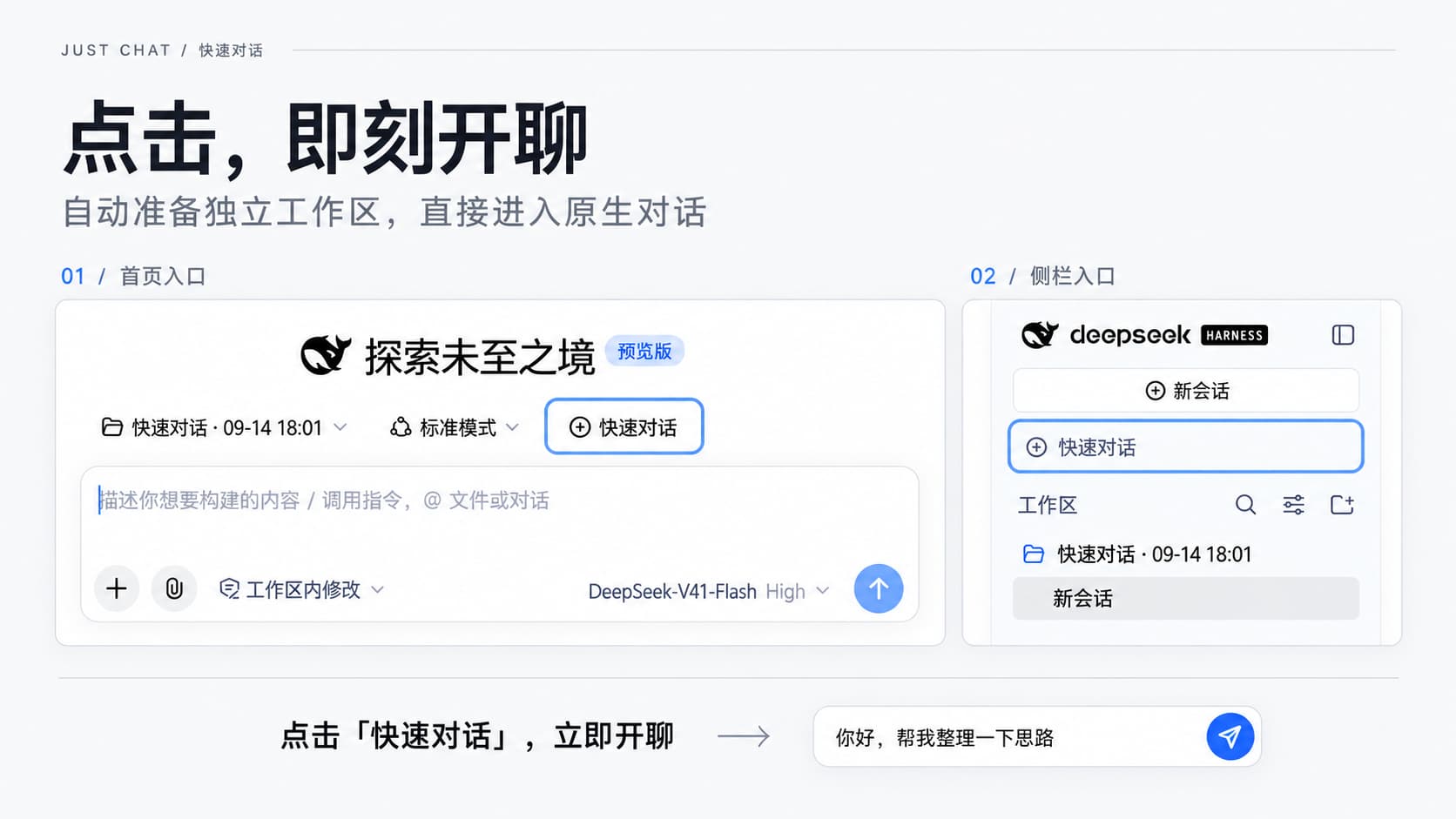
The development process followed RED and stayed lightweight: ask the AI to investigate, build a demo, and try it; when something does not work, report the observed behavior and continue the investigation. Once the main flow works, move into Evolve to complete the implementation. The AI handles the code, and real use provides the next piece of evidence.
The two rounds below use the basic conversation flow and the naming settings as examples. The dialogue has been shortened for readability. The second round is organized around the existing feature, while the screenshots show the actual result.
The development environment had the RED Skill loaded. Research (R) investigates and prototypes, Evolve (E) develops an authorized change, and Document (D) maintains the project's accepted knowledge. Their role becomes much easier to see in a concrete implementation.
Round one: From “add a button” to a working conversation
Start with a demo
The first request to the AI was short:
Build a quick-chat plugin for DSH. Clicking it should start a conversation without asking me to choose a project. Use RED to investigate how to implement it, and make a demo first so we can see the result.
This is the start of R. The AI needs to investigate how plugins are loaded and how the native chat view is opened, then use a demo to test whether the idea is viable. The experience is specified first; the implementation is explored through the prototype.
After opening the demo, clicking the button switched to the conversation view, but the input box still did not accept text. The next feedback was concrete:
The conversation appears, but the input box is still unusable. Investigate why, fix it, and try again.
Further investigation showed that the session had been created, but the native input still required a workspace. The AI had to inspect how the host connects sessions and workspaces, then adjust the call sequence. The code written during Research made it possible to decide whether this approach could work.
Trying the demo also clarified the directory requirement:
I want to use a separate directory for each temporary conversation. It should start directly even when there is no current workspace.
That sentence changes the shape of the solution. The AI now needs to investigate how to prepare a directory and workspace. The demo's target becomes precise: start without a workspace, click the entry, type a message, and receive a reply.
After another change, the AI tried the flow again and adjusted it from the observed result. The original “add a button” idea gradually became a defined behavior. A session that existed but could not accept input led to more research. Once the independent-directory approach made the main flow work, the implementation could continue.
When the flow works, move into Evolve
After the basic behavior was usable, the next instruction confirmed the direction:
The main flow works. Move into Evolve and finish the plugin. Put an entry on both the home page and the sidebar, and keep the other conversation capabilities native to DSH.
This gave the AI a clear boundary. It could organize the plugin structure, handle errors, connect configuration, improve the debugging path, and run the relevant checks around the selected design.
The Evolve work had one confirmed outcome: every entry opens the native conversation in an independent directory. The technical details were left to the implementation, and the result was checked through actual use.
The test then exposed another case. After clicking the entry twice, sending a message, and deleting the test workspace, the quick-chat entry did nothing when no workspace remained. The feedback was again just the observed behavior:
There is no workspace now, and clicking quick chat does nothing. Investigate this behavior.
The AI had to decide whether this was a local implementation bug or evidence that the design was incomplete. If the new finding affected the confirmed behavior, it had to explain the impact before adjusting the code.
“Start without a workspace” was already part of the accepted goal. The empty-workspace failure therefore had to be fixed around that goal, followed by another real-use check. Evolve still contains investigation, experiments, and feedback; the difference is that they now serve an authorized change.
By the end of this round, the visible behavior had changed from “choose a project first” to “click quick chat, type, and receive a reply.” Clicking again opened another independent workspace.
Try it, then accept the current version
Once the result matched the intended behavior, the next instruction was:
This works. Record the current usage and confirmed behavior in the documentation so future work can build on it.
The AI added the accepted result to D, including the README and development notes. At this point, “one independent directory per entry,” “use the native conversation,” and “deleting a workspace keeps its directory and conversation history” became the plugin's current conventions.
Those conventions matter for the next change. When settings are added, the AI needs to know which behaviors are fixed. When cleanup is discussed, it first needs to understand what the current implementation leaves behind. If a later decision changes one of these rules, the implementation and documentation need to move together.
The first round delivered a usable feature and a clear starting point for the next change.
Round two: Adjust names and settings after using it
The basic conversation now worked. The next goal was to make it more convenient: workspace names should be able to include a date, and each entry should be independently switchable.
Continue Research from the accepted result
The next request started from the first round's documented behavior:
Quick chat works now. Let the new workspace name be configurable, for example with the date and time, and let the home-page and sidebar buttons be switched independently. Investigate how to connect this to DSH settings, and make a demo first.
The AI started from the first round and investigated the settings entry point and naming mechanism. The question was now how to add configuration while preserving the independent-directory and native-conversation flow.
The settings UI was explored before it was finalized. The location of the configuration and the moment when edits take effect became explicit through another instruction:
Put it in the plugin's own settings card. Show a preview while editing, apply it only after Save, and let me discard the edit.
One more constraint made the behavior precise:
The new template should affect only workspaces created from now on. Do not rename existing ones.
The feedback turned “make it configurable” into an interaction rule: editing works on a draft, the preview reflects that draft, saving applies it to future workspaces, and existing workspaces stay unchanged.
The AI then adjusted the configuration and naming logic. The demo was tried again by editing the template, discarding an edit, saving a change, and creating a new workspace. Which behavior should remain and which detail still needed work emerged from that loop.
The second round moved forward from the first round's directory convention. The new request added a rule for how a workspace name changes, while the existing creation behavior stayed in force.
When the effect looks right, complete it in Evolve
Once the preview, toggles, and save behavior matched the desired interaction, the instruction was:
This behavior looks right. Move into Evolve and complete it. Keep the existing quick-chat behavior unchanged.
The AI implemented the interaction that had already been reviewed and checked its integration with the original creation flow.
The result was then used directly: change the name to include a date, save it, click quick chat, and inspect the new workspace name; edit a value and discard it, then check that the old value remains; disable the sidebar entry and start from the home page instead.
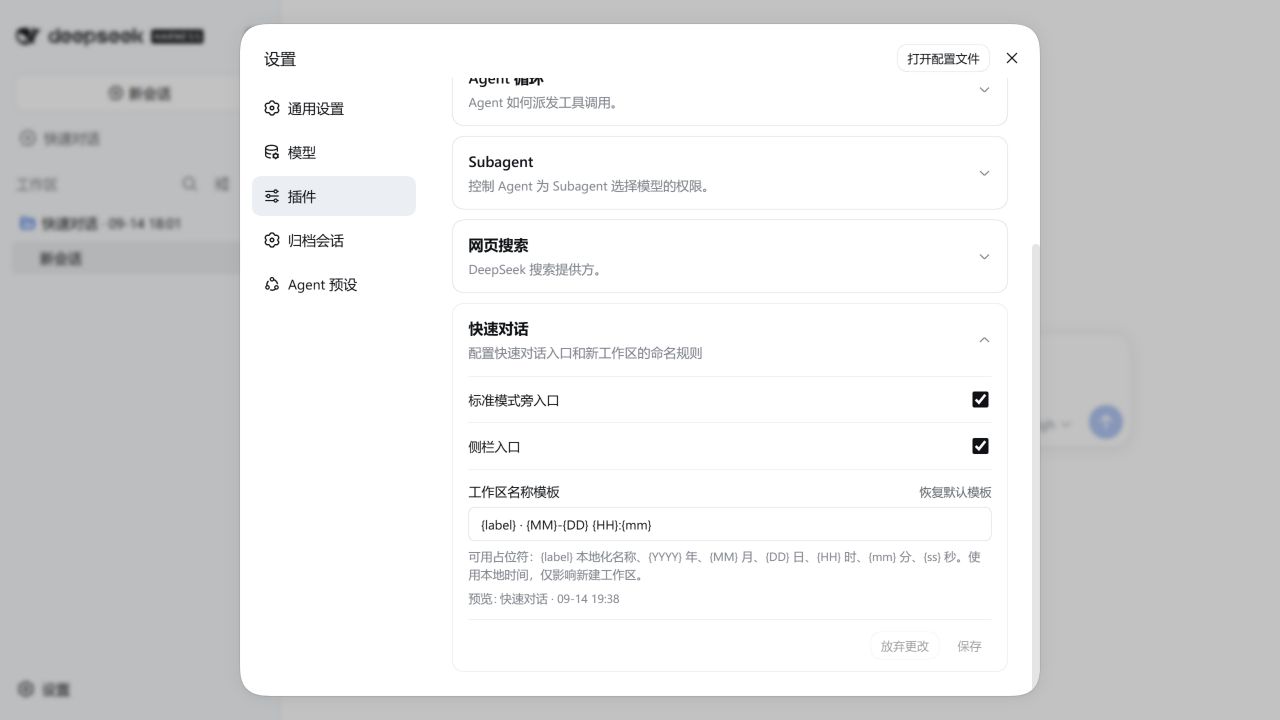
The finished configuration is shown above. Compared with the first round, the plugin can now start a conversation directly and adjust the entry points and naming template.
The interface was also refined through use. When the window became narrow and a button overflowed, the feedback stayed tied to the visible result:
The button overflows when the window is narrow. Check this layout.
The AI inspected the page and layout, fixed the issue, and tried the narrow window again. The internal checks and diagnosis were part of the implementation; the feedback remained about what a user could see.
Accept the change and update the current knowledge
After the second round felt right, the documentation request was explicit:
This works. Add the entry toggles and name-template usage to the documentation, and explain that they affect only new workspaces.
The AI updated D with the settings location, preview and save behavior, and the scope of the naming change. The independent-directory and native-lifecycle conventions stayed in place, while the new configuration rules were added to them.
The next request now has an updated starting point. If a future change needs templates to rename existing workspaces, that would replace a rule accepted in this round; the AI should investigate the impact before proposing the new behavior.
How RED shaped these two rounds
The instructions were ordinary: investigate it, make a demo, this does not work, this looks right, move into Evolve, and update the docs. Each sentence changed what the AI was allowed to assume next.
“Investigate it” made the AI explore an unknown through code and a prototype. The prototype's failures and the user's observations refined its understanding of the requirement and the technical boundary. “This works; move into Evolve” told it to turn a tested direction into a complete feature. After real use, accepting the result and updating D made the result available to the next round.
The understanding and the implementation changed together:
| Round one | Round two | |
|---|---|---|
| Starting point | Avoid choosing a project before a temporary conversation | Conversations work; adjust entries and names |
| Clarified during the prototype | Use an independent directory; start even with no workspace | Preview a draft; apply a saved template only to new workspaces |
| Development after confirmation | Complete the quick-chat plugin | Add settings that fit the existing creation flow |
| Accepted current knowledge | Conversation entry, directory, and lifecycle | Configuration and naming rules on top of the first round |
The person guided the direction through observed behavior. The AI investigated, implemented, and checked the impact. RED gave the open idea, the active choice, and the accepted convention different states, so the AI could adjust its work as evidence and decisions changed.
The next round can start with a new question or with a change that is already understood. This project started with a demo because the design needed to be judged through its behavior. It moved into Evolve when the main flow worked because the selected direction was ready to be completed. The right path depends on what is still unknown and what has already been decided.
Try the finished plugin
This case uses plugin 0.1.4 with DSH Web 0.1.5-rc.2. In a matching DSH environment that can already start a conversation, install it with:
dsh plugin --profile web add [email protected]
Use the same DSH Home and profile that you normally use. Restart DSH after installation and refresh the page. The source and usage are in the plugin repository; local development steps are in the development guide.
The plugin started from one small friction point: a temporary conversation required choosing a directory first. The implementation made the conversation flow work, then refined the entries and naming. Each try made the requirement more precise; the AI investigated and adjusted from the feedback, then completed the direction that had been confirmed. That is how RED participated in both rounds and left a useful starting point for the next change.
Continue with RED
To let an AI tool follow the same workflow in another repository, install the RED Skill at repository scope:
npx -y @exoticknight/red@latest skill install --scope repo
The command installs the Skill under .agents/skills/red. Before starting work, ask the AI tool to read .agents/skills/red/SKILL.md. RED separates three kinds of project knowledge:
- Research: investigate unknowns and test ideas.
- Evolve: implement and verify an authorized change.
- Document: maintain the understanding the project has accepted.
Read more in the RED repository and the full methodology article. The example plugin is dsh-just-chat.